

Track an order
Open any order to see where it is.
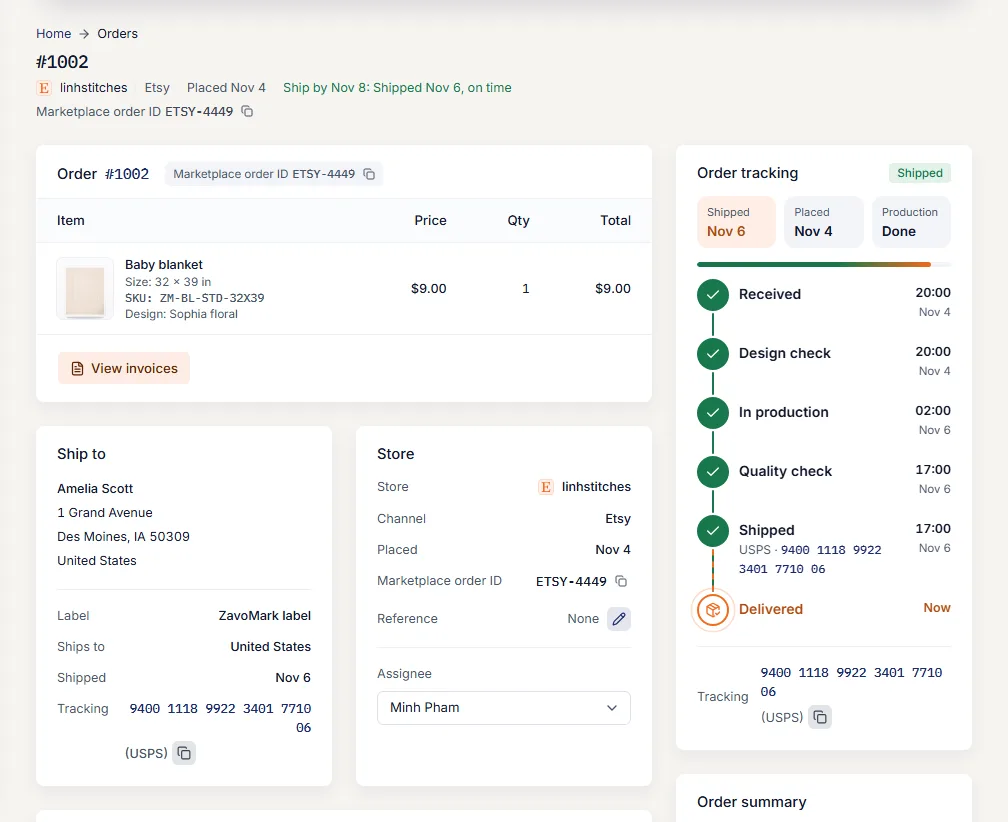
The tracking card
Section titled “The tracking card”The card at the top shows the steps: Received, Design check, In production, Quality check, Shipped and Delivered. The current step is highlighted. It shows when each step happened. While an order is in production, you see the production day, for example Day 2 / 3.
Before shipping, the card shows Expected to ship. After shipping it shows when it Shipped and the Tracking number.
What each state asks of you
Section titled “What each state asks of you”| State | What to do |
|---|---|
| Waiting for your approval of the stitch preview | Approve the stitch preview |
| The address could not be verified | Fix an address |
| Waiting for your TikTok shipping label | Upload a TikTok label |
| Queued, being stitched, quality check | Nothing. We are working on it |
Tracking number
Section titled “Tracking number”When an order ships, the tracking number appears with a copy button. Use Copy tracking number and paste it into your marketplace. You can also search orders by tracking number.
Activity
Section titled “Activity”The Activity list under the card records each change: the stitch preview ready, address found, queued, stitching started, quality check and shipped. Orders you cancel show Order cancelled.
Order summary
Section titled “Order summary”The summary shows items, shipping and design fees, your tier discount, the order total and what was charged to your wallet.
Parcel problems? See Shipping problems.