

API keys
The Seller API lets your own system create orders, read order status, read your wallet and get the product list. This page is a short guide. The full reference, with every endpoint and example, is at docs.zavomark.com.
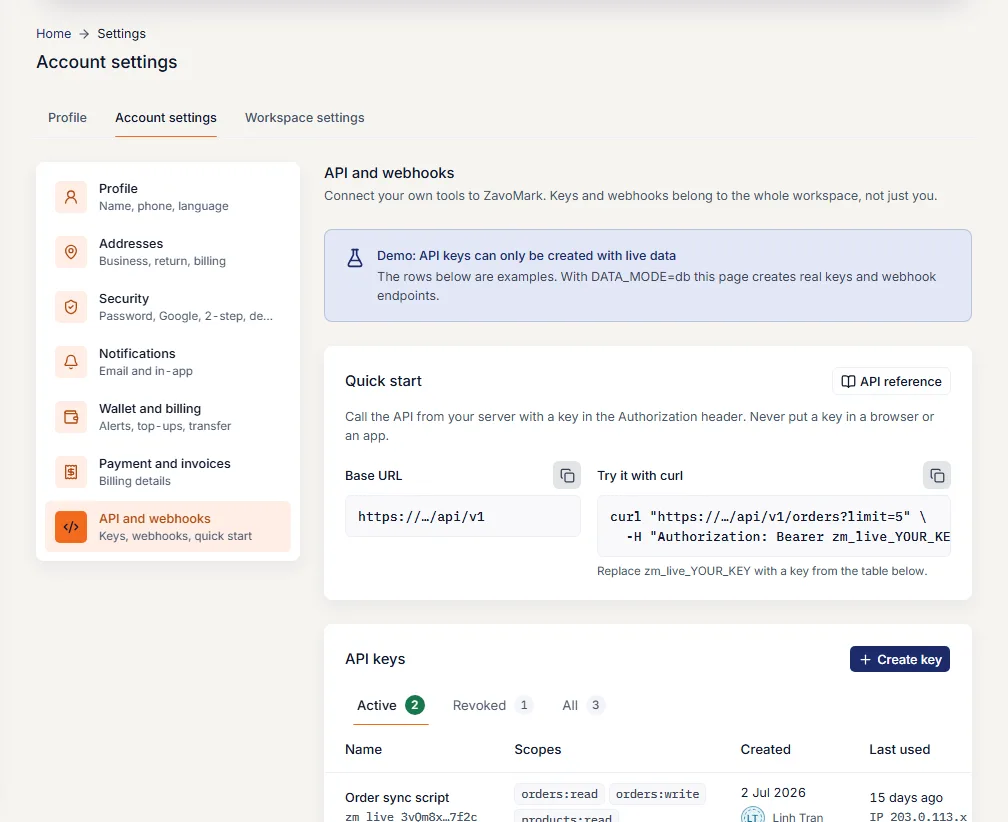
Create a key
Section titled “Create a key”Only the owner and admins can create keys.
- Open Settings > API and webhooks.
- Under API keys, select Create key.
- Enter a Key name that tells you where you use it, for example
Order sync script. - Pick the Scopes your tool needs, and nothing more.
- Create the key and select Copy key.
You see the key only once. ZavoMark keeps only a hash. Store it in your server settings or a password manager. If you lose it, revoke it and create a new one.
Scopes
Section titled “Scopes”| Scope | Allows |
|---|---|
products:read |
List products and prices |
orders:read |
Read orders |
orders:write |
Create and cancel orders |
wallet:read |
Read your wallet |
webhooks:manage |
Manage webhook endpoints |
Make a call
Section titled “Make a call”Send the key in the Authorization header from your server. Never put a key in a browser or in an app.
curl https://api.zavomark.com/v1/orders \ -H "Authorization: Bearer zm_live_YOUR_KEY"The page has a Quick start with a ready curl command. The base URL is https://api.zavomark.com/v1.
Good to know
Section titled “Good to know”- You can have up to 20 active keys.
- The default limit is 120 requests per minute per key.
- Orders you create need an
Idempotency-Keyheader, so a retry never creates a duplicate. - A key acts for your workspace through the member who created it. It stops working if you revoke it, or if that member is removed.
- Orders can use ZavoMark SKUs. See Products, sizes and SKUs.
Revoke a key
Section titled “Revoke a key”In the key list, choose Revoke next to the key and confirm Revoke key. Every request with that key fails from then on. Revoked keys stay listed for your records.
Reference
Section titled “Reference”See the full API reference.