

Approve the stitch preview
Before we sew a new design, we send you a stitch preview. It shows how the design will look in thread. Production waits until you approve it.
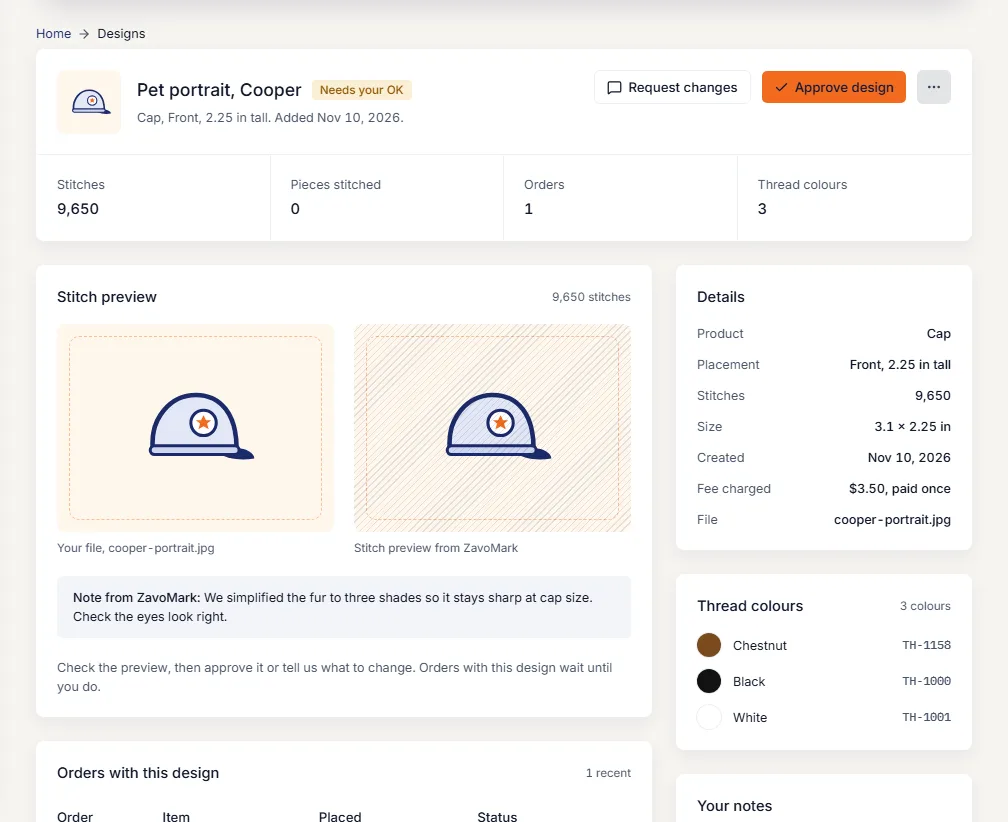
Approve a design
Section titled “Approve a design”- Open the order that says Design check in Orders, or open the design from Designs.
- Look at the Stitch preview. Compare it with Your file.
- Check the thread colors, small text and fine details.
- Select Approve design.
Every order waiting on that design moves to the machines. The design is then stitched from this file on every order.
Ask for changes
Section titled “Ask for changes”- Select Request changes.
- Describe what should change. For example:
make the name bigger and use navy thread. Write a few words at least. - Select Send request.
We send a new preview, usually within one working day. Production waits until you approve the new preview.
Approve several at once
Section titled “Approve several at once”On Orders, tick the orders in Design check and use Approve selected designs.
Who can approve
Section titled “Who can approve”Members with the Designs, Admin or Owner role. Others can look but not approve. See Roles and permissions.
Good to know
Section titled “Good to know”- Check the preview carefully. Differences caused by the design file you supplied are not covered by a refund. See Defects and wrong items.
- The sheet at the top of Designs shows Needs your OK so nothing waits unnoticed.